



Omnisend Review: The Email & SMS Tool WordPress Store Owners Actually Need
You built the store. You drove the traffic. But if you’re not following up with email and SMS, you’re leaving most of your revenue on the table. Here’s why Omnisend has become the go-to for WooCommerce stores — and whether it’s right for yours.
Here’s an uncomfortable truth about running a WordPress store: the sale rarely happens on the first visit. A shopper lands on your product page, adds something to the cart, gets distracted by a text message, and vanishes. Without a system to bring them back, that’s a lost sale — and it happens dozens of times a day on a busy store.
That “system to bring them back” is exactly what email and SMS marketing does. And among the dozens of tools that plug into WooCommerce, Omnisend keeps coming up as the one built specifically for ecommerce — not a generic newsletter tool wearing an ecommerce costume.
We spent time in the platform, wired it into a test WooCommerce store, and dug through what real store owners say. Here’s the honest breakdown.
What Omnisend actually is
Omnisend is an email and SMS marketing platform built for ecommerce stores. The distinction matters. Most email tools were designed for bloggers and newsletters, then bolted on store features later. Omnisend went the other direction — it starts with your products, orders, and customers, and builds the marketing around them.
For a WordPress store, that means it connects to WooCommerce and immediately understands things like: who abandoned a cart, who bought once and never came back, who’s a first-time visitor, and who your best repeat customers are. You don’t have to build that logic yourself — it’s baked in.
The features that matter for WordPress stores
1. Pre-built automation flows
This is the heart of it. Instead of manually emailing customers, you switch on automated “flows” that trigger on behavior:
- Abandoned cart recovery — automatically nudges shoppers who left items behind, the single highest-ROI automation in ecommerce.
- Welcome series — greets new subscribers and turns curiosity into a first purchase.
- Order confirmation & shipping — branded transactional emails that actually look like your store.
- Win-back campaigns — re-engages customers who’ve gone quiet before you lose them for good.
A newsletter plugin sends the same blast to everyone. Omnisend sends the right message to the right person at the moment they’re most likely to buy — cart abandoners get a reminder, loyal customers get early access, and lapsed buyers get a reason to return. That targeting is where the revenue hides.
2. Email and SMS in one workflow
Shoppers ignore email but open texts within minutes. Omnisend lets you combine both in a single automation — email first, then an SMS follow-up if they don’t bite. For time-sensitive nudges like an abandoned cart, that one-two punch can meaningfully lift recovery rates.
3. Drag-and-drop everything
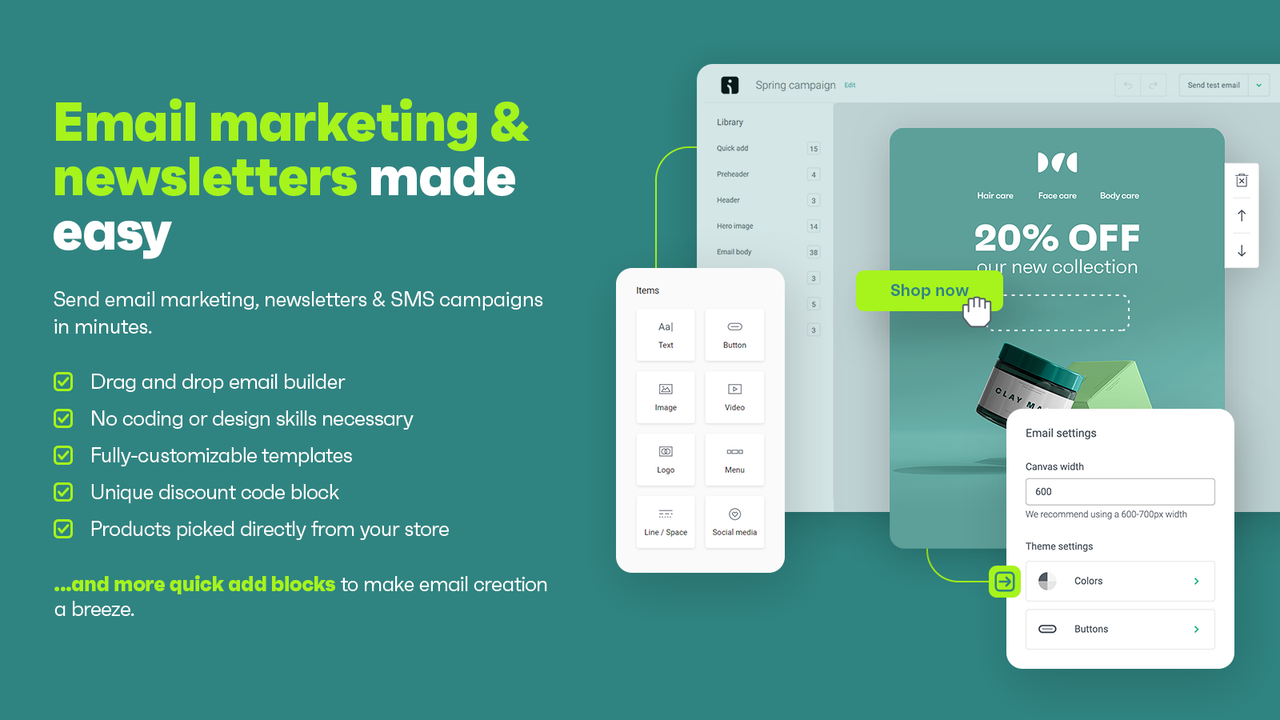
You don’t need to touch code. The email builder is genuinely drag-and-drop, signup forms and popups are built in, and you can pull live products straight from your WooCommerce catalog into an email with a product picker. For a solo store owner or a small team, that’s hours saved every week.
4. Segmentation that uses your store data
Because Omnisend syncs your WooCommerce orders, you can segment by real purchase behavior — total spent, number of orders, specific products bought, last order date. That means “email everyone who bought a coffee grinder but never ordered beans” is a five-minute job, not a data export nightmare.
The honest pros and cons
What we liked
- Built for ecommerce from the ground up
- Email + SMS in one platform
- Strong free plan to start
- Clean WooCommerce integration
- Pre-built flows work out of the box
Worth knowing
- Pricing scales with contact list size
- SMS credits are a separate cost
- Overkill if you only send occasional newsletters
- Advanced reporting sits on higher tiers
Who Omnisend is (and isn’t) for
Omnisend is a strong fit if you run a WooCommerce store with actual products to sell and you want your marketing to run on autopilot. It shines the moment you have carts to recover and customers to bring back.
It’s probably more than you need if you run a content blog with no store, send the occasional update, and have no ecommerce component. In that case a lighter newsletter tool will do the job for less.
The bottom line
If you’ve done the hard work of building a WordPress store and driving traffic, the email and SMS follow-up is where a big chunk of your profit actually lives. Omnisend makes that layer approachable — no developer, no spreadsheets, no guesswork. The free plan means you can wire it into your store and see recovered carts before you spend a cent.
Get 30% OFF Omnisend for 3 months
Set up abandoned cart recovery, welcome flows, and SMS campaigns in an afternoon — then save 30% for your first 3 months with the code below.
Claim 30% off with Omnisend →Disclosure: This post contains affiliate links. If you sign up for Omnisend through a link on this page, WP Daily Live may earn a commission at no extra cost to you. We only recommend tools we believe deliver real value to WordPress store owners. See our affiliate disclosure for details.