


Table of Contents
Trainual Review 2026: Is Trainual Worth It?

Training a new employee shouldn’t mean sending them a Google Drive folder containing 47 documents and telling them to “go through everything.”
Yet that’s exactly how onboarding works in many growing businesses.
Company policies are stored in one place. SOPs are somewhere else. Training videos are in another folder. Important information is buried in Slack. And the person who actually knows how something works is usually the employee who has been doing it for three years.
Trainual is designed to solve that problem.
Trainual combines employee onboarding, training, SOP documentation, knowledge management, testing and accountability into one platform. Its current product also includes an Operations suite covering meetings, goals, scorecards and team updates.
👉 Want to see Trainual for yourself?
What Is Trainual?

Trainual is an employee training and knowledge-management platform designed to help businesses document how work gets done and train employees to follow those processes consistently.
Instead of keeping company knowledge scattered across:
- Google Docs
- PDFs
- Slack
- Notion
- Loom
- Spreadsheets
- Individual employees’ notes
Trainual provides a centralized system for organizing training and business processes.
Its current Training suite includes:
- Documentation and SOPs
- Employee onboarding
- Training paths
- AI knowledge search
- Testing and tracking
- Roles and responsibilities
- Accountability
- Org charts
- Software and tool management
Trainual also has an Operations suite covering meetings, decisions, action tracking, team updates, scorecards, KPIs and goals.
Best image source: Getty Images for a premium hero image; Unsplash for a free alternative.
Important: Don’t download Getty/Shutterstock images without the appropriate license.
Why Businesses Use Employee Training Software

The real problem isn’t usually a lack of information.
It’s information that’s difficult to find, inconsistent or outdated.
Imagine hiring a new sales representative.
You need to teach them:
- How your company works
- What your product does
- How to use your CRM
- How to qualify leads
- How to run a sales call
- How to create proposals
- How to handle objections
- How to report their activity
Without a standardized system, every manager may teach those things differently.
Trainual’s approach is to turn those processes into structured, searchable training that can be assigned to employees based on roles or teams.
Trainual Features
1. Employee Onboarding
Onboarding is one of Trainual’s core use cases.

Instead of giving every new employee the same information, you can create training paths around their specific role.
For example:
Marketing employee
- Company introduction
- Brand guidelines
- Content process
- SEO workflow
- Social media guidelines
- Marketing tools
- Reporting process
Sales employee
- Product training
- CRM training
- Lead qualification
- Sales process
- Call scripts
- Proposal process
- Customer handoff
Trainual supports assigning training based on individuals, roles and teams.
Our take
This is where Trainual makes the most sense.
If your business hires frequently or has several different roles, standardized onboarding can eliminate a lot of repetitive manager work.
👉 Build a structured onboarding system
2. SOP and Process Documentation

SOPs are arguably the foundation of Trainual.
An SOP explains exactly how a recurring task should be performed.
For example:
Customer Refund SOP
Step 1: Find the customer’s order
Step 2: Confirm eligibility
Step 3: Process the refund
Step 4: Update the CRM
Step 5: Send confirmation
Step 6: Record the reason
This gives employees a repeatable process instead of relying on memory.
Trainual specifically positions itself around creating and organizing SOPs and turning them into step-by-step training.
Better visual option
For this section, I’d actually recommend an original infographic instead of stock photography:
Process → SOP → Training → Assignment → Test → Completion
That will look more like a genuine editorial review.
3. AI-Powered Knowledge Search
A company knowledge base is only useful if employees can find the answer.

Trainual currently offers AI-powered knowledge search / Q&A, designed to help employees get answers from company information.
Imagine an employee asking:
“What’s our process for approving a customer refund?”
Instead of messaging their manager, they can search the company’s documented knowledge.
That changes the workflow from:
“Who knows this?”
to:
“Where is this documented?”
4. Training Tests and Progress Tracking

Completing training isn’t the same as understanding it.
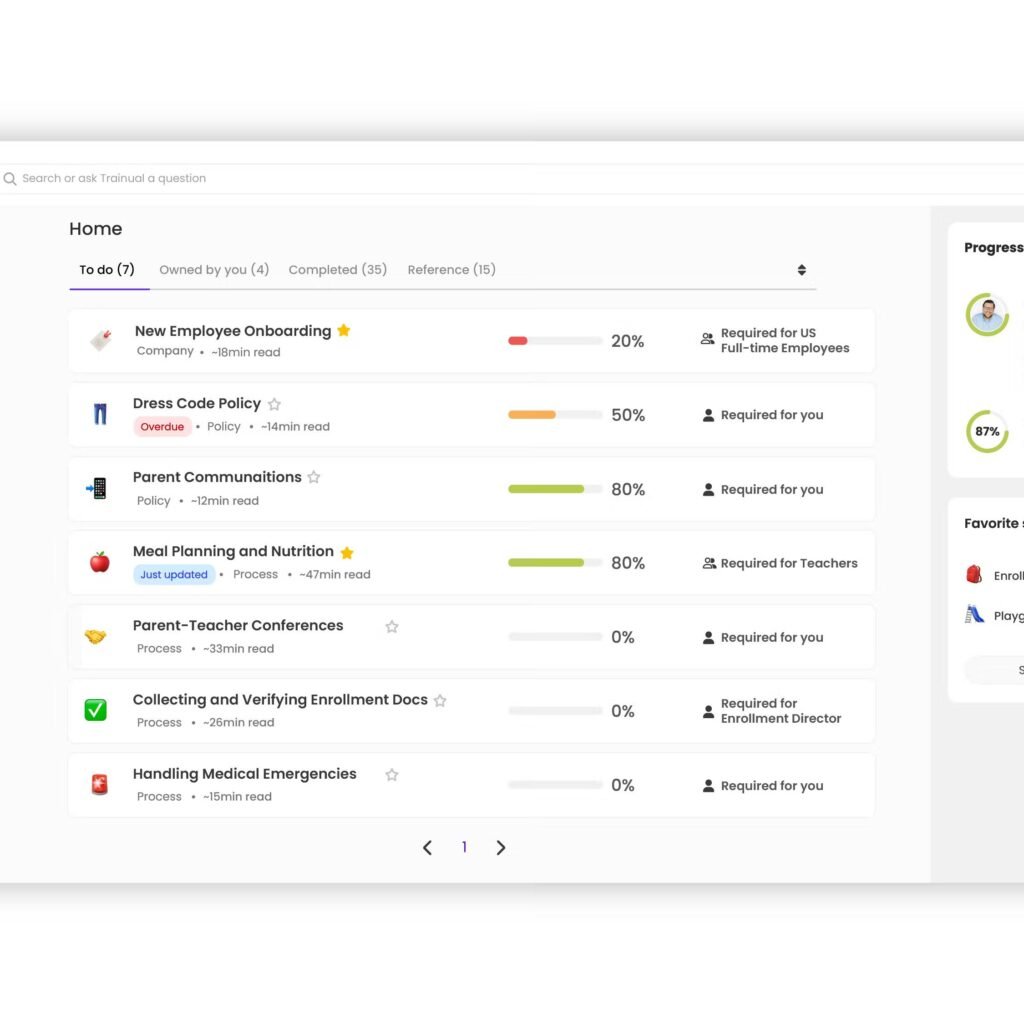
Trainual provides completion tracking, tests and reporting so managers can see employee progress and verify whether assigned training has been completed. Trainual also describes features such as quizzes, due dates and e-signatures for certain policies and training workflows.
This is particularly useful for:
- New-hire onboarding
- Compliance training
- Internal policies
- Sales training
- Customer service procedures
- Safety procedures
- Company-specific processes
5. Training Templates
Starting with a blank page is one of the biggest reasons businesses never finish documenting their processes.

Trainual currently promotes 400+ employee training templates covering roles, processes and policies.
These templates can give businesses a starting point for:
- Employee onboarding
- Job responsibilities
- Company policies
- Sales
- Marketing
- Customer service
- Operations
- Management
- Software procedures
The important part isn’t simply having templates.
It’s getting your documentation system started quickly enough that employees actually use it.
6. Video and Visual Training

Some processes are difficult to explain through text.
For example:
“Here’s how to create a customer in Salesforce.”
A five-minute screen recording can be more useful than a 1,500-word SOP.
Trainual supports multimedia training and promotes videos, visuals and GIFs as part of its training content.
7. Dashboard and Training Analytics

Trainual’s dashboard provides visibility into team usage, training progress, content ownership and outstanding actions.
The current dashboard can show things such as:
- Active users
- Searches
- Team completion
- Content ownership
- Pending actions
- Usage insights
- Time spent versus time saved
Trainual Pricing

Trainual’s pricing should be checked directly before publishing because SaaS pricing and plan features can change.
The current pricing structure includes Core, Pro, Premium and Enterprise, with different capabilities depending on the plan.
Rather than publishing an old price from another review, link readers directly to the current Trainual offer.
👉 Check the current Trainual plans
See Trainual pricing and get started →
Trainual Pros and Cons

Pros
- Centralized employee training
- Structured onboarding
- SOP documentation
- Role-based training
- Training completion tracking
- Knowledge search
- AI capabilities
- Training templates
- Multimedia content
- Reporting and dashboards
- Integrations
- Operations features
Cons
- Not every small business needs dedicated training software
- Initial documentation still requires work
- SOPs must be maintained
- Advanced functionality can require higher plans
- Businesses with extremely simple processes may find a dedicated platform unnecessary
Trainual vs Notion vs Google Drive

| Feature | Trainual | Notion | Google Drive |
|---|---|---|---|
| Document storage | ✅ | ✅ | ✅ |
| SOP documentation | ✅ | ✅ | ✅ |
| Employee onboarding | ✅ | ⚠️ | ⚠️ |
| Role-based training | ✅ | ⚠️ | ❌ |
| Training tracking | ✅ | ⚠️ | ❌ |
| Tests/quizzes | ✅ | ⚠️ | ❌ |
| Employee progress | ✅ | ⚠️ | ❌ |
| Knowledge management | ✅ | ✅ | ⚠️ |
| Operations features | ✅ | ⚠️ | ❌ |
The key distinction is that Trainual is purpose-built around employee training, documentation and accountability, rather than simply providing a flexible place to store information.
Who Should Use Trainual?

Trainual makes the most sense for companies dealing with repeatable processes and growing teams.
Agencies
Document:
- Client onboarding
- Reporting
- Project workflows
- Internal processes
SaaS Companies
Train:
- Sales teams
- Customer success
- Support
- Product knowledge
- Internal software workflows
Multi-location businesses
Standardize processes across locations.
Professional services
Make client delivery more consistent.
Growing companies
Move institutional knowledge from employees’ heads into a system the entire organization can access.
Trainual specifically lists growing, remote, multi-location, field-based and service-based teams among its use cases.
Who Probably Doesn’t Need Trainual?
Here’s the part many affiliate reviews won’t tell you.
If you have three employees sitting in the same office and everyone already knows the workflow, you probably don’t need sophisticated employee-training software.
A shared Google Doc or Notion workspace may be enough.
Trainual becomes more relevant when you have:
- Frequent hiring
- Multiple departments
- Multiple locations
- Remote employees
- Complex SOPs
- Repetitive employee questions
- Formal training requirements
- A need to track completion
That’s the real buying trigger.
How to Set Up Trainual Properly

Don’t make the mistake of trying to document your entire company on day one.
Step 1: Identify your 20 most important processes
Start with the workflows employees perform repeatedly.
Step 2: Assign an owner
Every SOP needs someone responsible for keeping it accurate.
Step 3: Create role-based training
Don’t make employees read irrelevant material.
Step 4: Add videos where appropriate
Show complicated software workflows instead of writing enormous explanations.
Step 5: Add tests
For critical processes, verify understanding.
Step 6: Review your content
Processes change.
Your training platform is only useful if the information inside it remains accurate.
Is Trainual Worth It?
It depends on what you’re trying to fix.
If you simply need somewhere to store documents, Trainual may be more than you need.
But if your business has a problem with:
- inconsistent onboarding
- undocumented processes
- repetitive employee questions
- scattered company knowledge
- training accountability
- keeping employees aligned
then Trainual’s combination of SOPs + onboarding + training + search + tracking becomes much more relevant.
🚀 See Trainual in action
Final Verdict
Trainual isn’t simply another document-management platform.
Its real proposition is:
Document the process → train employees → assign responsibilities → verify understanding → track completion → keep the knowledge updated.
That makes it particularly relevant for businesses where consistent execution matters.
If you’re still onboarding employees through a mixture of Google Docs, Slack messages, PDFs and “ask John, he knows how to do it,” that’s exactly the kind of problem Trainual is designed to address.
Ready to build a repeatable employee training system?
👉 Try Trainual today
What is Trainual?
Trainual is employee training, onboarding, SOP and knowledge-management software designed to help businesses standardize how work gets done.
Is Trainual an LMS?
Trainual includes LMS-style training capabilities, but its positioning extends into SOP documentation, onboarding, knowledge search, accountability and business operations.
Is Trainual good for employee onboarding?
Employee onboarding is one of Trainual’s core use cases, including role-based training paths and completion tracking.
Does Trainual have AI?
Yes. Trainual currently offers AI capabilities including knowledge search/AI Q&A and an AI assistant.
Can Trainual track employee training?
Yes. Trainual provides completion tracking, reporting and dashboards for monitoring employee training progress.
Does Trainual have SOP templates?
Yes. Trainual currently advertises 400+ employee training templates covering roles, processes and policies.
Does Trainual integrate with other software?
Yes. Trainual supports integrations and automation options, including Zapier/webhooks; its help documentation also describes HR/payroll integrations.
Affiliate disclosure: We may earn a commission if you sign up through our link, at no additional cost to you.